Team communication
Hotel staff communication software for pass-along, shift handoffs, and team chat
When the morning front desk agent leaves, whatever they knew about the late checkout, the guest waiting on a callback, and the leak housekeeping mentioned leaves with them, unless it was written down somewhere the next shift will look. Front desk teams, supervisors, and GMs live with the result: repeated questions, missed requests, and incidents nobody can reconstruct.
GuestEQ gives the property categorized operations notes, a shared Hotel Feed, and team chat organized by hotel and company, so a handoff is written once and can still be found next month.
Who it is for
Anyone who starts a shift needing to know what happened on the last one, and anyone above the property who needs to know without calling.
Front desk agents and supervisors
A pass-along the next shift will actually read, and a place to look up what happened with a guest yesterday.
Housekeeping and maintenance
Hear about a room problem from the desk without a phone call, and leave a note the other department can find.
General managers
Incidents, handoffs, and department updates in one place, instead of scattered across personal phones.
Management companies
Company-level conversations with every property, without being added to every hotel's front desk chat.
What is included
Notes for things that need a record, chat for things that need a conversation, and a Feed that shows both to the people on shift.
Operations notes
- Categories for pass-along, end of shift, guest incident, employee incident, lost and found, and do not rent
- Daily revenue update, CRM, and sales lead notes alongside them
- Department labels on every note
- Search and pagination across the hotel's notes
- Controls for posting and for managing note types
Hotel Feed
- Shared activity stream for the property
- Pass-along notes, daily revenue notes, and completed department checklists appear as they happen
- Comments on feed items
- Shortcuts to team chat, guest texts, tasks, rooms, and the help center
Team chat
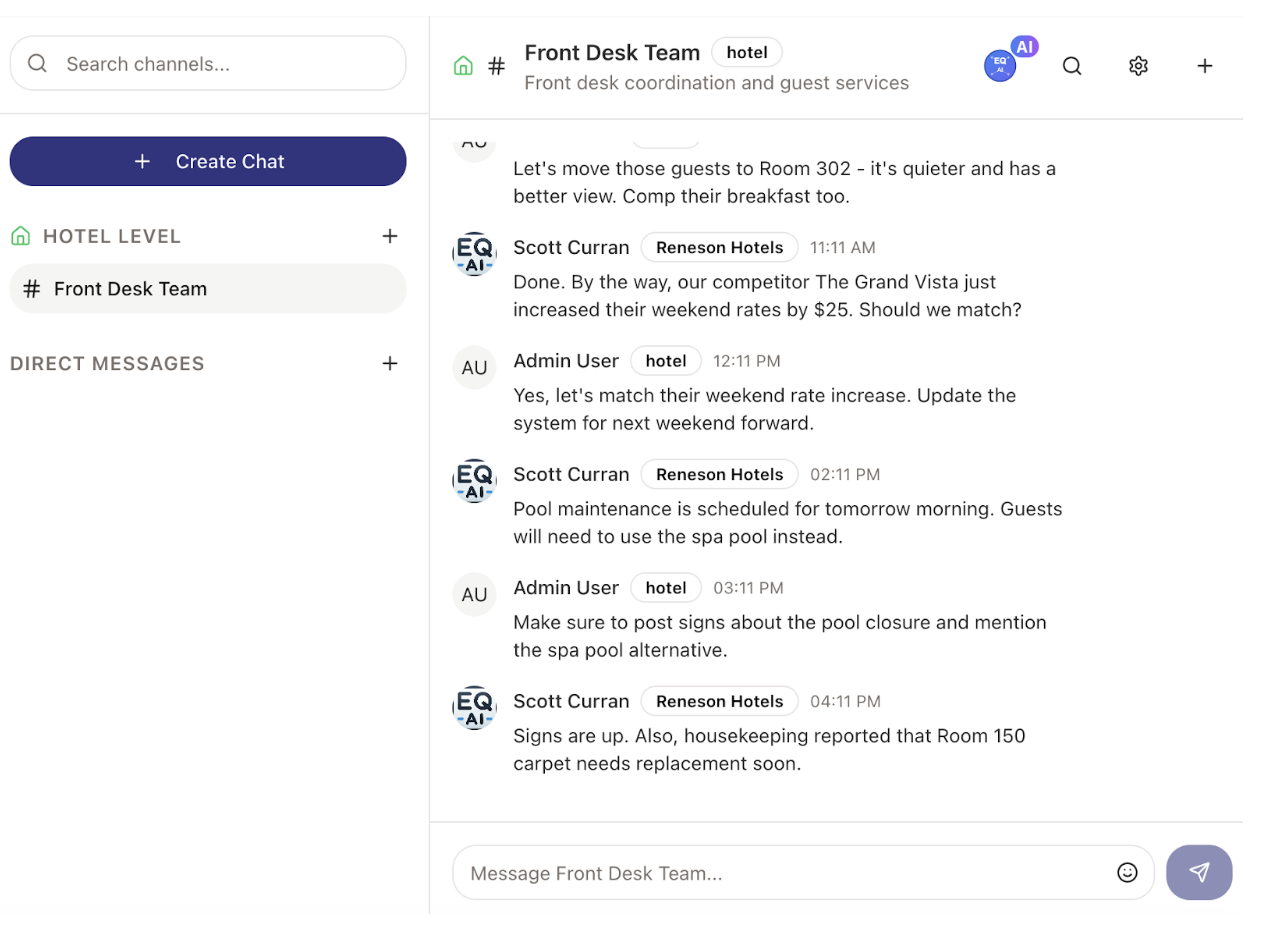
- Chat groups at brand, management-company, and hotel level
- Direct messages
- Create new chats and search across them
Around the conversation
- Notifications for mentions, chat, task assignments and due dates, follow-ups, and operations notes
- Daily checklists by department and shift, with task and comment areas
- A help center where staff ask and answer questions by topic
From shift handoff to searchable record
A pass-along that only exists in a text thread is gone by the weekend. This is the path it takes in GuestEQ.
Step 1: Write it once
The agent going off shift files a pass-along or end-of-shift note with a category and department, instead of telling whoever happens to be nearby.
Step 2: It reaches the Feed
Pass-along notes appear in the Hotel Feed, where the incoming shift, the GM, and other departments see them and can comment.
Step 3: Talk it through
Anything that needs a conversation moves to the hotel's team chat or a direct message, with mentions notifying the right person.
Step 4: Find it later
Incidents, lost and found, and do-not-rent records stay searchable by category, so next week's question has an answer.
Where it helps on an ordinary day
The 3 p.m. shift change
A late checkout, a guest waiting on a callback, and a room with a slow drain. The morning agent files one pass-along note; the afternoon agent reads it in the Feed rather than piecing it together from the day.
A guest incident that comes back
A guest disputes a charge two weeks later. The guest incident note, with its department and time, is still there to search, rather than in the memory of an agent who has since left.
Lost and found and do-not-rent
Records the whole desk needs to check are kept in their own categories instead of a binder behind the counter or a sticky note on a monitor.
A message from the management company
A regional director shares an update in a company-level chat group that reaches each property's leaders, without joining every hotel's front desk conversation.
What hotel teams say
“Implementing the GuestEQ system had an immediate impact on guest satisfaction scores and increased communication between staff members. The team at GuestEQ handled all of our staff training and we were up and running within a week.”

Thalia Manzo
General Manager — Hampton Inn by Hilton
“Whether we are communicating internally with team members or texting with our guests, GuestEQ keeps us organized and on track with checklists, action items, and work orders.”

Charee Dion
Director of Sales — Hilton Garden Inn Napa
Quotes describe each customer's own property and experience.
Communication beside the work, not a separate app
A standalone messaging app can carry the conversation, but it does not know that the leak is in room 214, that the room is on today's housekeeping list, or that the guest complained yesterday. In GuestEQ the notes and chat sit in the same system as rooms, checklists, and tasks, so the people reading a handoff are working from the same room list and task board.
Weighing a collaboration-first platform instead? Read how GuestEQ compares with hotelkit.
Scope. Team chat and notes are for staff. Texting guests is a separate capability, covered by guest messaging. GuestEQ does not replace radios or phones for things that need an answer in the next five minutes.
Questions about hotel team communication
How is this different from a group text or a messaging app?
Group texts live on personal phones and scroll away. In GuestEQ, pass-along, end-of-shift, and incident notes are filed by category and department, searchable later, and kept as the hotel's records. Chat is organized by hotel and company rather than by whoever happened to create the thread.
What kinds of notes can the team record?
The notes area includes categories for pass-along, end of shift, guest incident, employee incident, lost and found, do not rent, daily revenue updates, CRM, and sales lead, each with a department label. The area also has controls for managing note types.
Who can see which conversations?
Chat groups sit at brand, management-company, and hotel level, alongside direct messages, and access follows each user's role and hotel assignments. A regional leader can be part of company-level conversations without being added to every property's front desk chat.
Will staff be notified when something needs them?
Notification settings cover mentions, chat messages, task assignments and due dates, follow-ups, and operations notes. Each person's notification preferences can be set in GuestEQ.
Does it replace radios or phone calls?
No. When a guest needs something in the next five minutes, a radio is still faster. GuestEQ is for what the next shift, the GM, or the management company needs to know later: the handoff, the incident, the follow-up that cannot depend on someone remembering.
Show us how your shifts hand off today
Bring last week's pass-along, whatever form it takes, and we will show the same handoff in GuestEQ.
Related GuestEQ capabilities
- Hotel checklist software
Department tasks with owners and due dates, daily checklists by shift, and handoff notes, so the day's work is followed through.
- Hotel housekeeping software
Daily room assignments, a supervisor inspection queue, and cleaning history with start and end times.
- Hotel guest messaging for texting guests
Guest Chat with in-house, upcoming, and checked-out guest lists.
- Hotel portfolio management software
Above-property administration, company-level chat and documents, transition tracking, and portfolio digests.
- The GuestEQ platform and its modules
How modules are selected and combined across a portfolio of branded and independent hotels.